CS184 Section 6
Back to OpenGL
Brandon Wang
March 5, 2013
Material adapted from Fu-Chung Huang
Brandon Wang
March 5, 2013
Material adapted from Fu-Chung Huang
OpenGL refresher
Matrix Stacks
Perspective, LookAt matrices
OpenGL and hardware acceleration
GLSL/Shading
Think back to AS0.
We now have some tools to define things in 3D space.
OpenGL is a rasterizer (at heart), and is different than your ray tracer
void display()
{
  // "Old" style OpenGL
  // Clear Buffers
  glClear(GL_COLOR_BUFFER_BIT | GL_DEPTH_BUFFER_BIT \
    | GL_STENCIL_BUFFER_BIT);
  glMatrixMode(GL_PROJECTION);
  glLoadIdentity();
  // fovy, aspect, znear, zfar
  gluPerspective(60.f, 1.f, 1.f, 50.f);

  glMatrixMode(GL_MODELVIEW);
  glLoadIdentity();
  // lookFrom x,y,z, lookAt x,y,z, up x,y,z
  gluLookAt(0.f,5.f,5.f,
      0.f,0.f,0.f,
      0.f,1.f,0.f);

  glPushMatrix();
  glRotatef(glutGet(GLUT_ELAPSED_TIME)/10.f, 0.f, 0.f, 1.f);
  glTranslatef(0.f, 3.f, 0.f);
  glutSolidSphere(0.5f, 20.f, 20.f);
  glPopMatrix();
  glutSolidTeapot(1.f);
  glutSwapBuffers();
}
GPUs implement many graphics algorithms in hardware (hardware acceleration).
OpenGL uses the hardware to render, and so you will not have to implement some of the more fundamental algorithms (like polygon clipping or scan conversion).
Don't forget those algorithms, though!
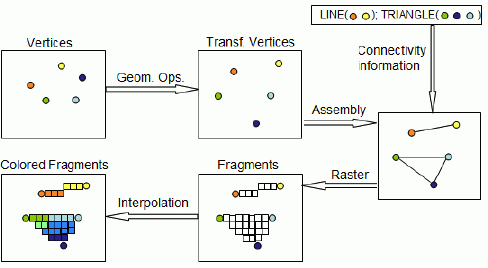
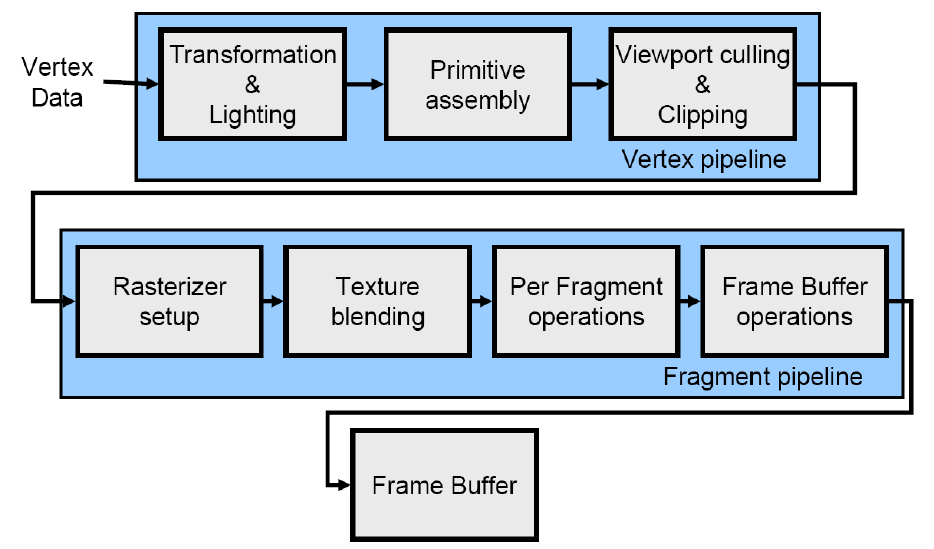
Back in the day, you would feed vertices into OpenGL, and the rest was taken care of by hardware.
Now, people would want to have more control over things...
Specialized GPU Shading Languages.
Example: GLSL
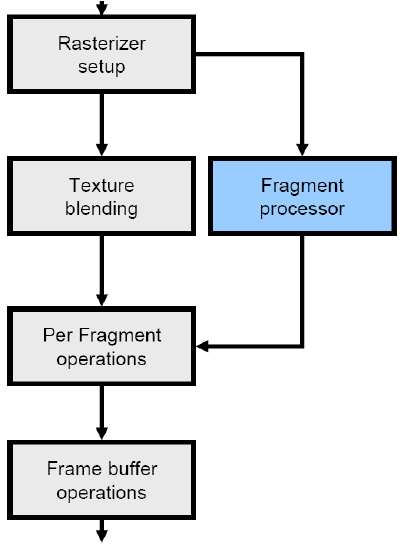
Transf vertices : Vertex Shader
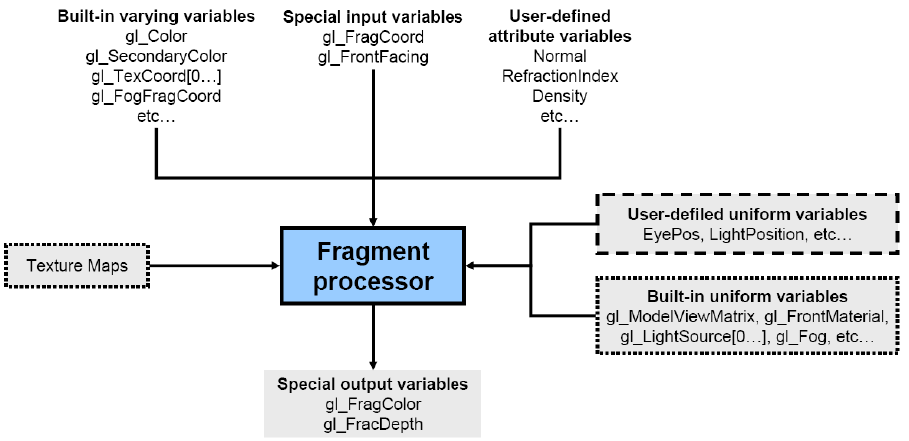
Colored fragments : Fragment Shader
Transformation/Lighting : Vertex Shader
Per Fragment Operations : Fragment Shader
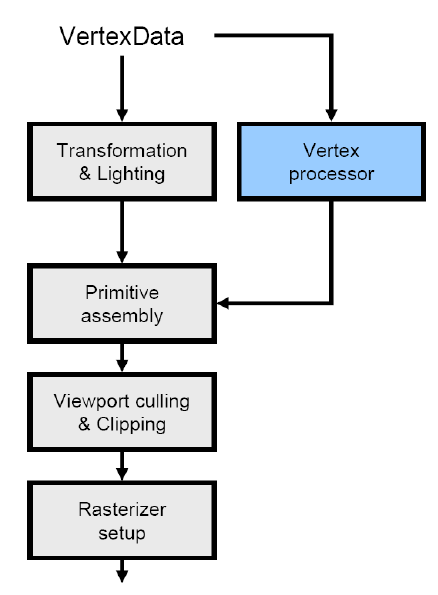
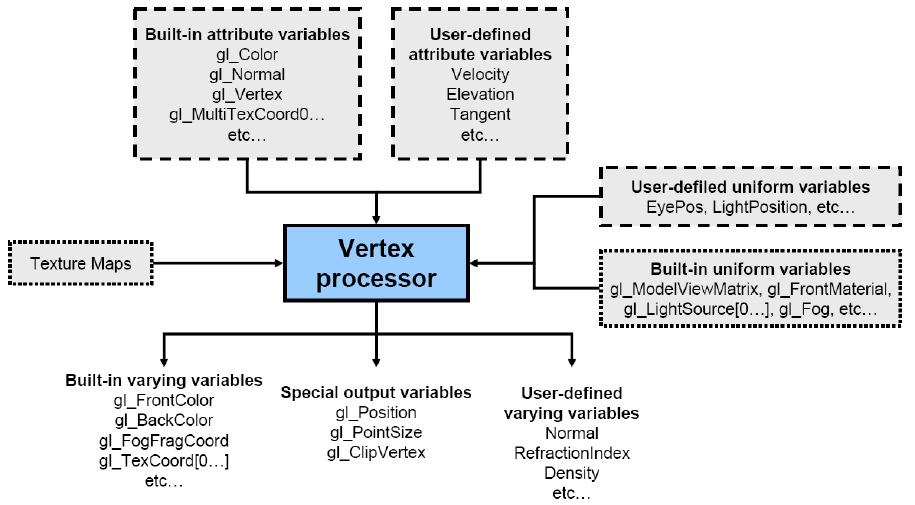
void main()
{
  gl_Position = gl_ModelViewProjectionMatrix * gl_Vertex;
}
uniform vec3 color;

void main()
{
  gl_FragColor = vec4(color, 1.f);
}
We'll learn more about this later, but you send values from the C++ OpenGL side...
int color_loc = glGetUniformLocation(shaders[cur_shader]->id(),
    "color");
glUniform3f(color_loc, 0.f, 1.f, 0.f);
// Time example
//glUniform3f(color_loc,
//    (glutGet(GLUT_ELAPSED_TIME)%2000)/2000.f,0.f,0.f);
void main()
{
  gl_Position = gl_ModelViewProjectionMatrix * gl_Vertex;
}
uniform vec3 color;

void main()
{
  gl_FragColor = vec4(color, 1.f);
}
varying vec3 normal;

void main()
{
  gl_Position = gl_ModelViewProjectionMatrix * gl_Vertex;
  normal = gl_Normal;
}
varying vec3 normal;

void main()
{
  // Renormalize the normal, because it may not be unit after interpolation
  gl_FragColor = vec4(normalize(normal), 1.f);
}
varying vec3 normal;

void main()
{
  gl_Position = gl_ModelViewProjectionMatrix * gl_Vertex;
  normal = gl_NormalMatrix * gl_Normal;
}
varying vec3 normal;

void main()
{
  // Renormalize the normal, because it may not be unit after interpolation
  gl_FragColor = vec4(normalize(normal), 1.f);
}
The OpenGL code we've been showing is "old"-style OpenGL.
"New" style OpenGL is more difficult to learn, but is more in-line with what modern hardware does. You will typically implement various features yourself, and OpenGL turns into just a rasterizer.
(Examples: Matrix stacks, matrix values, vertex buffers)
You don't need to know the difference (right now), but if you are interested, OpenGL ES (mobile), WebGL (web) require "new" style.